
Little Chickie Pics1.0 - App Store
You'll be able to see results in few seconds.
Publisher Description
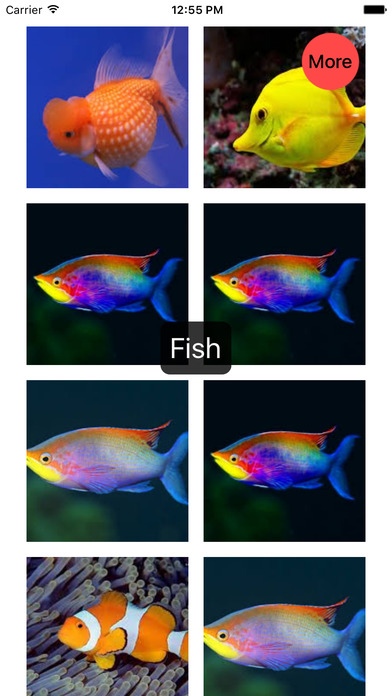
A simple app to help with infant and toddler vocabulary. Currently has animal and colour words included. This is a simple app I built for my son. I will add more categories and words if anyone finds it useful.
The app requires an internet connection but does not allow web browsing.
Instructions:
^^^^^^^^^
1) Start the app.
2) Select a category
3) Select a red circle to randomly view a different word with pictures. Select show all to see all options. Select reset to change categories.
4) When viewing pictures select the more icon (top right corner) to select a different word.
Send feedback and suggestions to brad@beyondthecube.ca
PRIVACY POLICY
What personal information do we collect from the people that visit our blog, website or app?
We do not collect information from our users.
We do not use cookies for tracking purposes
Users can visit our site and use our app anonymously.
Third-party disclosure
We do not sell, trade, or otherwise transfer to outside parties your Personally Identifiable Information.
We do not include or offer third-party products or services.
Our site and app do not allow third-party tracking.
Contacting Us
If there are any questions regarding this privacy policy, you may contact us using the information below.
http://www.beyondthecube.ca
PO Box35
Manitoba R3X 1X1
Canada
brad@beyondthecube.ca
Last Edited on 2016-08-31
Requires iOS 8.3 or later. Compatible with iPhone, iPad, and iPod touch.
About Little Chickie Pics
The company that develops Little Chickie Pics is Brad Reid. The latest version released by its developer is 1.0.
To install Little Chickie Pics on your iOS device, just click the green Continue To App button above to start the installation process. The app is listed on our website since 2016-09-04 and was downloaded 0 times. We have already checked if the download link is safe, however for your own protection we recommend that you scan the downloaded app with your antivirus. Your antivirus may detect the Little Chickie Pics as malware if the download link is broken.
How to install Little Chickie Pics on your iOS device:
- Click on the Continue To App button on our website. This will redirect you to the App Store.
- Once the Little Chickie Pics is shown in the iTunes listing of your iOS device, you can start its download and installation. Tap on the GET button to the right of the app to start downloading it.
- If you are not logged-in the iOS appstore app, you'll be prompted for your your Apple ID and/or password.
- After Little Chickie Pics is downloaded, you'll see an INSTALL button to the right. Tap on it to start the actual installation of the iOS app.
- Once installation is finished you can tap on the OPEN button to start it. Its icon will also be added to your device home screen.
Version History
version 1.0
posted on 2016-09-04
Disclaimer
Official App Store Link
We do not host Little Chickie Pics on our servers. We did not scan it for viruses, adware, spyware or other type of malware. This app is hosted by Apple and passed their terms and conditions to be listed there. We recommend caution when installing it.
The App Store link for Little Chickie Pics is provided to you by apps112.com without any warranties, representations or guarantees of any kind, so access it at your own risk.
If you have questions regarding this particular app contact the publisher directly. For questions about the functionalities of apps112.com contact us.
